

Depositing crypto into Roxom is fast and secure. You can fund your account with BTC, USDC, or USDT. This guide walks you through the steps, requirements, and important details for each currency.Documentation Index
Fetch the complete documentation index at: https://docs.roxom.com/llms.txt
Use this file to discover all available pages before exploring further.
Before you begin
Your account must be verified to access deposit addresses. If your Account Verification (KYC) is still pending, you won’t be able to make deposits yet.Supported currencies and networks
- BTC
- USDC
- USDT
| Detail | Value |
|---|---|
| Network | Bitcoin (BTC) |
| Minimum deposit | 0.000006 BTC |
| Confirmations required | 3 |
| Estimated time | 30–60 minutes |
| Funds credited to | Funding Account |
Polygon, Base, and Ethereum are all EVM-compatible networks. Your deposit address is the same across all three networks and for both USDC and USDT — you only need one address for all EVM deposits.
How to start a deposit
You can begin a deposit from two places:- From the Assets menu (top-right) → click Deposit
- From your Funding Account → click the Deposit button
Deposit flow
Select network
- For BTC: the network is fixed to Bitcoin (BTC).
- For USDC or USDT: choose between Polygon, Base, and Ethereum.
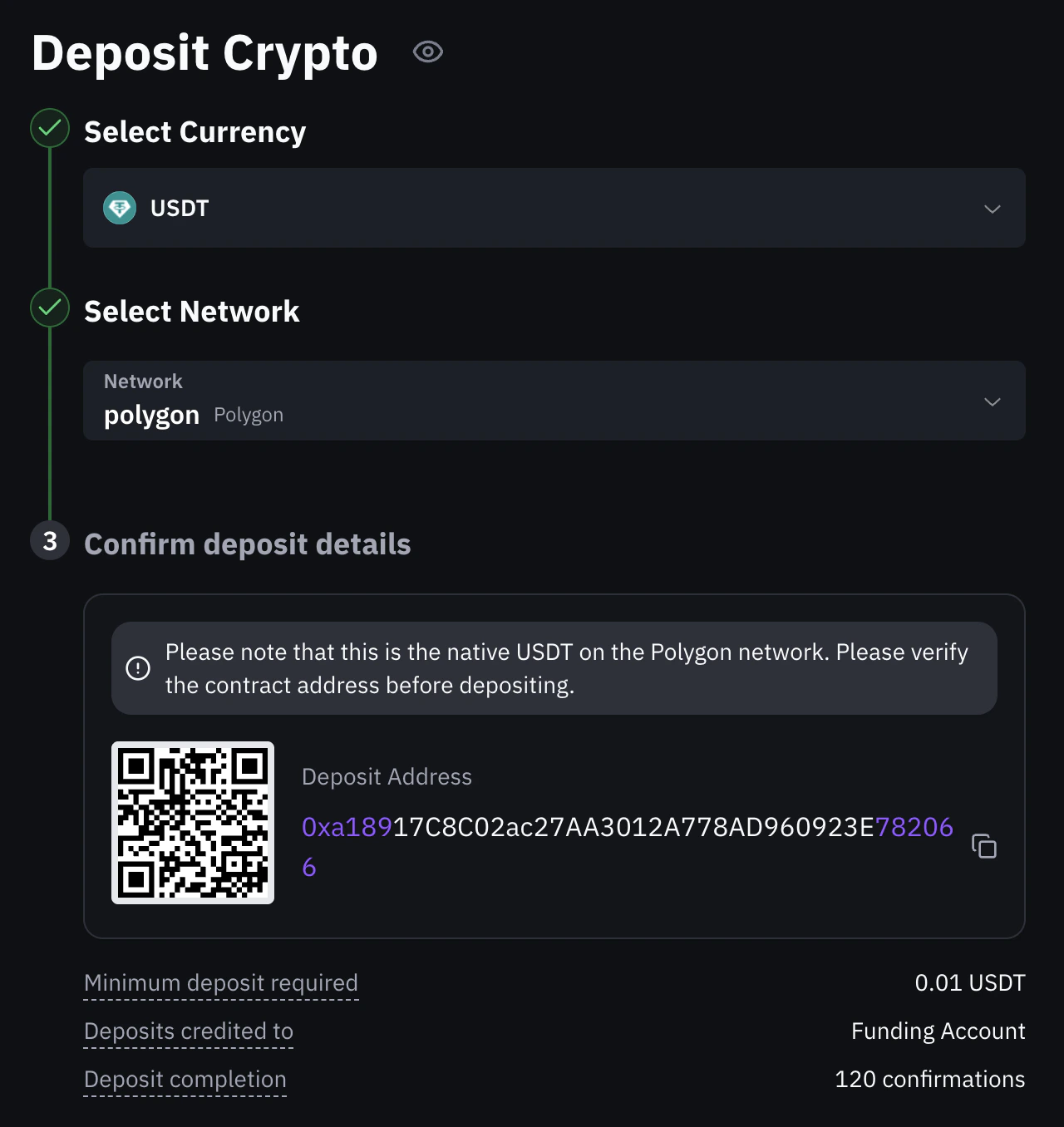
Confirm deposit details
You’ll see your personal deposit address and a QR code. Copy the address or scan the QR code from your sending wallet.
- BTC addresses start with:
1,3,bc1q, orbc1p - USDC/USDT addresses are EVM addresses starting with
0x
- Minimum deposit required (e.g., 1 USDT)
- Deposits credited to: Funding Account
- Deposit completion: number of confirmations needed
For USDC/USDT deposits, the platform will display a reminder to verify you are sending the native token on the selected network. Always confirm the contract address before depositing.
Are there any deposit fees?
Roxom does not charge fees for crypto deposits. However, your sending wallet or exchange may charge a network fee when sending the transaction. This fee is not collected by Roxom.When will my deposit be available?
As soon as Roxom detects the transaction on the network, it will appear as Pending in the Recent Deposits section. Your funds become available once the transaction reaches the required number of confirmations for the selected network. Until then, the deposit is visible but not usable for trading or withdrawal.All deposits go to your Funding Account
Regardless of the currency you deposit — BTC, USDC, or USDT — all funds are credited to your Funding Account. From there, you can transfer them to your Unified Trading Account (UTA). BTC can be used for trading immediately. If you transferred USDC or USDT, you must first sell them for BTC using One-Click Trade (Swap) before you can trade. See Understanding your Roxom accounts to learn how these accounts work, or How to transfer funds for a step-by-step guide.Compliance and protection
Roxom monitors all incoming deposits under strict anti-money laundering (AML) standards. If a deposit is flagged due to high-risk activity, it may be temporarily held or rejected as part of our Transaction Monitoring protocols.Video guide
Need visual guidance? Watch this step-by-step video tutorial:Need help?
Still have questions? You can speak to Roxy, our AI support assistant, available 24/7 in the chat bubble at the bottom right of your screen. You can also contact our support team directly at help@roxom.com.Related articles
How do I check the status of my withdrawal?
Open article
How to withdraw crypto from your Roxom account
Open article